dēzl™
- 4.7
- Rating
- 100.00K
- Installs
- Free
- Price
 Analysis by App-foxy
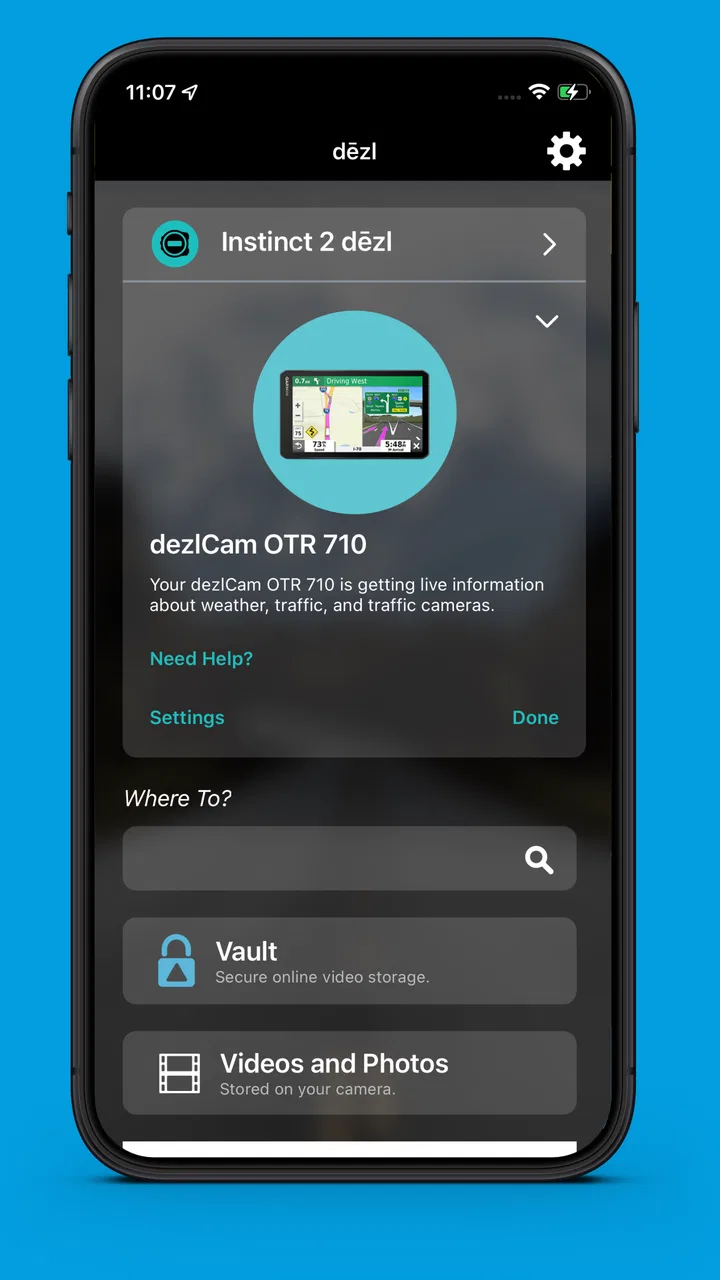
If you drive a truck for work, the useful question is not whether a navigation app can draw a route. Most of them can. The real question is whether it helps you plan a long run without turning every stop, road restriction, and last-minute change into extra mental work. That is where dēzl™ feels different from an ordinary phone navigation app. It comes from Garmin, sits in the Auto & Vehicles category, and is designed around the needs of drivers who spend serious time on the road.
I approached it as a companion for long-distance driving rather than as a replacement for every navigation tool on a phone. In that role, it makes sense. The interface and purpose are more focused than a general map app, and the experience feels aimed at people who want their driving setup to support a routine. It is free, rated for Everyone, and available for devices running Android 9 or later. Those details make it easy to try, although the value you get depends heavily on whether you actually need a truck-oriented Garmin experience.
How dēzl™ feels during a normal drive
My first impression is that this is an app built for preparation as much as movement. A casual navigation app is usually opened when you are already holding your phone and ready to leave. A truck-focused tool has a different job: it should help you think about the route before the vehicle starts moving, then remain dependable when the trip becomes repetitive, tiring, or complicated.
You May Also Like

 Google Keep - Notes and lists
Google Keep’s Quiet Growth Shows the Appeal of Simpler Notes
As mobile work gets busier, Google Keep keeps winning a simple contest: capture a thought quickly, find it later, and get on with the day.

 Blood Strike: 2.5 Anniversary
Blood Strike’s Loadouts Turn Every Drop Into a Tactical Gamble
A close look at Blood Strike’s custom loadouts: how fast access to signature weapons reshapes its battle royale rhythm, rewards preparation, and narrows the gap between fights.

 Pandora - Music & Podcasts
Pandora’s Music Is Easy to Start, but Harder to Recover
Pandora’s strength is its low-effort path from a seed to a station. Its weak spot is how much confidence it asks you to place in connection, setup, and quiet recovery.

 8 Ball Pool
 Is Built on Rivalries, Rematches, and Routine
A close look at the rivalries, rematches, shared routines, and unanswered safety questions that turn a quick pool match into a persistent mobile community.

 Samsung Music
’s Quiet Strength Is Playing What You Already Own
Its reach comes less from spectacle than from dependable access to a personal library. That simplicity is both the app’s strongest retention engine and its ceiling.

 AccuWeather: Weather Radar
AccuWeather Review: A Quick, Clear Forecast for Everyday Decisions
For everyday plans, the best forecast is the one you can understand quickly. AccuWeather makes rain timing, radar, and local conditions easy to act on, with a few trade-offs.
More From Our News Desk



That distinction matters for perceived speed. I would not judge dēzl™ only by how quickly a map appears. For a professional driver, speed also means reaching the information you need without wandering through unrelated consumer features. A focused layout can feel faster even when the underlying phone is doing the same basic kind of work as another navigation app.
Garmin has kept the product identity clear. The short store description is simply “dēzl™,” while the broader message is “CONNECT FOR THE LONG HAUL.” I read that as a sign that the app is intended to belong in a larger driving setup, not merely serve as a one-off route finder. That can be an advantage if you already use Garmin equipment or prefer a consistent brand experience, but it may feel less compelling if you only want the quickest possible directions on a city commute.
The current release is version 2.10.11, and the app has been available since January 26, 2022. I mention that because an established navigation app is usually easier to assess as part of a daily routine than a brand-new experiment. Its average rating is 4.6 from around 8.6 thousand ratings, which suggests that many users find the overall approach useful. I still would not treat a rating as a promise that every phone, route, or driving style will feel equally smooth.
Where the app can feel faster than a general alternative
The strongest speed advantage is organizational rather than dramatic. A general map app is excellent when I need a quick destination, nearby businesses, live traffic context, or a familiar pedestrian-style map. dēzl™ is more interesting when the journey itself is the main task. The less time I spend translating a car-oriented route into something suitable for a larger vehicle, the more useful the app becomes.
One practical habit is to prepare the route before pulling away. I would enter the destination while parked, review the proposed journey, and check whether the plan matches the vehicle and the day’s work. That small pause is more valuable than trying to make corrections while moving. It also gives the phone time to settle before the demanding part of the trip begins.
Another useful approach is to keep the app in its proper lane. I would not use it as my only source for every kind of local information. For a quick restaurant search or a short trip across town, a familiar general-purpose map may be quicker. For a long haul where the vehicle’s needs matter, dēzl™ has a clearer reason to exist.
What happens when the workload becomes heavier
Navigation apps are easiest to judge on a simple route. The real test comes when a journey includes several stops, a changed delivery plan, poor reception, frequent rerouting, or a driver who needs to switch between planning and active guidance. These moments place more pressure on the phone, the interface, and the person using it.
I would treat dēzl™ as a planning tool that rewards a disciplined workflow. Before leaving, I would organize the day’s destinations, confirm the route, and make sure the phone is mounted where the screen can be read without taking attention away from the road. During the drive, I would avoid treating the app like a live planning desk. If a stop changes, I would pull over before editing the trip.
This is also where the difference between a truck-focused app and a standard navigation app becomes a trade-off. A general alternative may offer a broader ecosystem for discovering places and reacting to traffic. dēzl™ is more specialized, so its usefulness rises when the journey is connected to professional driving rather than spontaneous exploration. Specialization can reduce clutter, but it also means the app is not trying to be everything.
For a realistic example, imagine starting early with a long delivery run and two planned stops. I would use the app before departure to establish the day’s shape, then keep the phone connected to power throughout the drive. If the first stop takes longer than expected, I would update the next destination only after parking. That workflow reduces the temptation to make hurried changes and lets the app support the route instead of becoming another distraction.
Stability, recovery, and the habits that protect a trip
Reliability is not only about whether an app crashes. It is also about how confidently I can recover when something interrupts the trip. A phone may receive a call, lose power, switch networks, become hot in a windshield mount, or run short of available memory. No navigation app can remove every device problem, so the sensible question is whether my setup gives the app a fair chance to recover.
I would begin with simple preparation: update the app when convenient, restart the phone if it has been running for days, close unnecessary heavy apps, and start with a well-charged device. These are not glamorous tips, but they matter more on a long route than a polished first launch. The app is only one part of the system; the phone, mount, cable, and visibility all affect the experience.
If guidance is interrupted, I would not immediately assume the route is wrong. First I would check whether the phone is still receiving location information, whether the display is responsive, and whether the device has enough power. If the app needs to be reopened, I would do that while safely stopped. A recovery plan is especially important for drivers who cannot afford to improvise at a busy junction.
The app has accumulated around 100 thousand installs, and its Everyone content rating makes it broadly approachable from an age-classification perspective. Those facts do not guarantee identical stability across all hardware, but they do make it a reasonable candidate for a trial on a compatible phone. I would test it on a short familiar route before trusting it with an unfamiliar all-day journey.
My own standard for reliability is simple: can I prepare, start, pause, and resume without feeling that the app is fighting me? A navigation tool should fade into the background once the route is underway. If I have to repeatedly search through menus or second-guess the display, the problem is not necessarily a crash; it is friction. That kind of friction becomes more noticeable after several hours behind the wheel.
Phone limitations are part of the decision
Because dēzl™ runs on a phone, the phone’s limits remain important. The minimum operating system is Android 9, so compatibility should be checked before installation. A supported operating system is only the starting point, though. Screen size, battery condition, storage pressure, heat, and the quality of the vehicle mount can all change how comfortable the app feels.
A small screen may be adequate for a short trip but tiring when I need to glance at route information repeatedly. An older battery may also create anxiety during a long drive, especially if the display stays bright and the phone is charging in a warm cabin. I would use a dependable power connection and position the device so that I can read it with brief glances rather than leaning toward it.
Resource demands are best considered in practical terms rather than guessed from the app alone. Navigation naturally asks a phone to keep location services, the display, and other system processes active. If the device is already slow, crowded with background apps, or prone to overheating, dēzl™ may expose those weaknesses. I would not install it on a phone that is already struggling with basic tasks and expect a smooth professional setup.
There is also a difference between having the app available and having a complete driving solution. Some drivers may prefer a dedicated navigation unit because it keeps the phone free for calls and work messages. Others may prefer a general phone map because it combines navigation with broader search and traffic tools. dēzl™ makes the most sense for someone who wants Garmin’s approach on a compatible mobile device and is willing to build a careful in-vehicle routine around it.
Privacy and distraction concerns also affect my recommendation, even without turning them into technical speculation. I would avoid handling the phone while driving, use a secure mount, and make all route changes while stopped. A free app is not automatically a good bargain if it encourages unsafe interaction. The best experience comes when the phone is treated as a set-and-glance instrument, not as a handheld screen to operate continuously.
Who will get the most from this app?
I would recommend dēzl™ first to truck drivers, fleet workers, and people who regularly make long vehicle-based journeys and want a navigation experience aimed at that reality. It is also worth trying if you already like Garmin’s ecosystem and want your phone to fit into that preference. The app’s free price removes the biggest barrier to testing it, so a driver can compare it with an existing setup without committing money first.
The strongest use case is not a single emergency trip. It is repeated work: similar long routes, multiple destinations, early starts, and a need to prepare before moving. In that environment, consistency matters. A tool that feels familiar each morning can reduce small decisions, and reducing small decisions is valuable when the main task is driving safely for hours.
I would be more cautious about recommending it to someone who only drives short urban trips. If your needs are mainly finding a nearby shop, checking public places, or exploring a new neighborhood, a general map app may be more convenient. The specialized focus could be unnecessary, and installing another navigation tool may add confusion instead of removing it.
I would also skip it as a first choice if your phone is below Android 9, has a weak battery, or becomes unreliable when running navigation. In that situation, upgrading the device or using dedicated hardware may solve the underlying problem better than switching apps. Likewise, if your work depends on a particular fleet system or company workflow, compatibility with that setup should come before personal preference.
How it compares with familiar navigation choices
Compared with a standard phone map, dēzl™ trades breadth for specialization. The standard option usually wins for casual searches, local discovery, and the kind of quick destination entry most people use on weekends. Garmin’s app is more appealing when the vehicle and the length of the journey shape the decision. That is not a universal victory; it is a different priority.
Compared with dedicated truck navigation hardware, the phone app is easier to try and avoids buying another screen immediately. The trade-off is that the phone remains a shared device. Calls, notifications, charging, heat, and other apps can interfere with the driving experience. Dedicated hardware may be better for someone who wants a separate, always-ready instrument and does not mind the extra equipment.
Compared with a basic route planner, dēzl™ feels more appropriate when driving is the central activity rather than a small part of a broader phone task. I would choose the simplest tool that matches the job. If the job is a quick car trip, use the tool that gets you moving with the least effort. If the job is a long professional run, a truck-oriented approach deserves consideration.
My performance verdict after looking at the whole workflow
My verdict is positive, with a clear condition: dēzl™ is worth trying when your driving needs are genuinely long-haul or truck-focused. Its perceived speed comes from purpose and workflow more than from flashy behavior. It can feel efficient when I prepare the route, keep the phone powered, mount it properly, and avoid making changes while moving.
Its stability is best protected by realistic expectations. I would test it before a major trip, keep a sensible backup plan, and judge it on the phone I will actually use in the vehicle. A strong rating and a growing install base make the app look established enough to investigate, but they do not replace a personal trial on familiar roads.
The biggest limitation is that specialization narrows the audience. I would not choose it simply because it is free, and I would not expect it to replace every feature of a general map app or every advantage of dedicated hardware. The right question is whether its truck-oriented focus solves a problem you regularly have.
For me, that makes dēzl™ a practical option for drivers who value preparation, consistency, and a navigation setup built around long journeys. It is not the universal answer for every phone user, but it has a clear purpose. If that purpose matches your daily driving, the free download makes testing it a sensible first step. If your trips are short and casual, your usual map app may remain the faster, simpler choice.
Before relying on it for work, I would install it on a compatible device, try a familiar route, check how the screen behaves in the mount, and practice recovering from an interruption while parked. That short test tells you more than a store rating can. In the right vehicle and workflow, Garmin’s app can become a useful part of the routine rather than another screen competing for attention.
FAQs for dēzl™
01What features does the dēzl™ app offer for truck drivers?
The dēzl™ app is designed specifically for professional truck drivers, offering features such as custom truck routing based on the size and weight of your vehicle, real-time traffic updates, and alerts for upcoming bridge heights and weight limits. It also includes a trip planner and access to truck-specific services.
02Is the dēzl™ app available for both Android and iOS devices?
Yes, the dēzl™ app is available for download on both Android and iOS platforms. You can find it on the Google Play Store for Android devices and the Apple App Store for iOS devices. Ensure your device meets the minimum requirements for optimal performance.
03Does the dēzl™ app require an internet connection to function?
While the dēzl™ app can function with offline maps, many features such as real-time traffic updates and weather alerts require an active internet connection. It is recommended to use the app with a stable internet connection to access all its functionalities effectively.
04How can I update the maps in the dēzl™ app?
Map updates for the dēzl™ app are typically provided through the app itself. Users are notified when updates are available and can download them directly within the app. Regular updates ensure that drivers have access to the most current routes and information.
05Is there a cost associated with the dēzl™ app?
The basic version of the dēzl™ app is free to download, but it may offer in-app purchases or a subscription model for advanced features and enhanced functionalities. Check the app store listing for detailed pricing information and available subscription tiers.
Pros
- Intuitive interface for easy navigation.
- Customizable alerts for road conditions.
- Real-time traffic updates enhance safety.
- Extensive database of truck stops.
- Voice command feature for hands-free use.
Cons
- Limited offline map functionality.
- Occasional GPS signal loss in rural areas.
- Battery consumption is relatively high.
- Subscription required for premium features.
- Interface may lag on older devices.

dēzl™
Gallery